





Arrow Cube 3D is a spatial puzzle game where you rotate a cube to guide arrows through targets and obstacles.
The core challenge is visualizing paths in three dimensions—each rotation changes which faces are visible and how arrows will travel when released. This article covers the most useful gameplay mechanics: how rotation affects arrow direction, which obstacles block or redirect your shots, and how to plan multi-step solutions.
You’ll find practical details on reading the cube’s layout, anticipating arrow behavior, and approaching levels that require precise timing.
How to Play Arrow Cube 3D
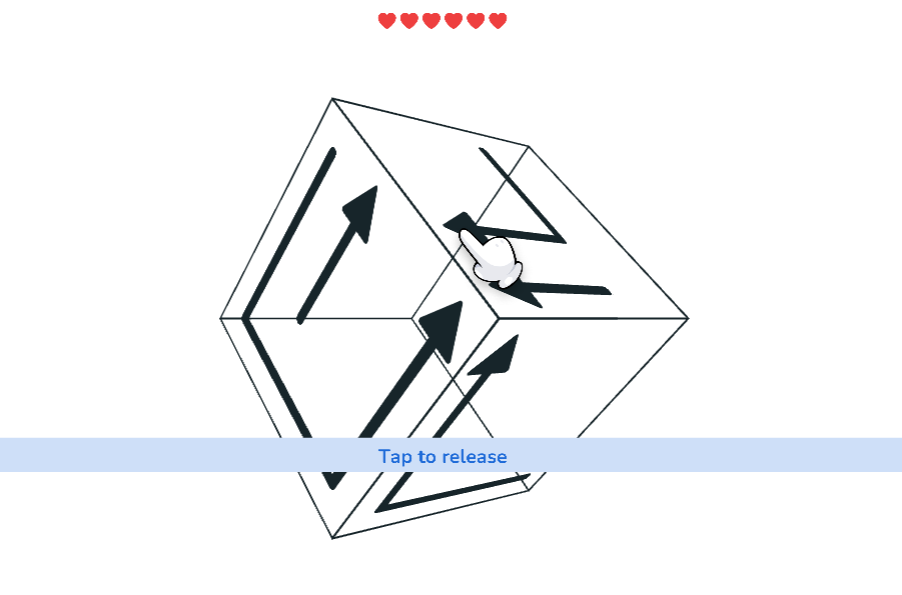
Arrow Cube 3D is a 3D puzzle where you clear arrows from a wireframe cube by tapping them in the correct order. An arrow leaves only when nothing blocks its path. Drag to rotate the cube, read each arrow’s direction, and remove arrows in a sequence that keeps opening new lanes. The level ends when every arrow is gone.
The opening hint points to one arrow with a clear path. Tap it, watch it turn blue and fly off, then rotate to find the next open arrow. A pale gray trace marks where an arrow has already left. Solid black arrows are still active—follow the point to check the lane. If another arrow occupies that space, the path is blocked and the tap will fail.
How to play:
-
Drag to rotate the cube. Turn the view to inspect front, sides, and back. Dragging changes only the camera angle; it does not move or reorder arrows.
-
Read each arrow’s direction. Follow the point and check its lane. If another arrow sits in that path, it is blocked.
-
Tap or click an open arrow. A legal move turns the arrow blue before it flies off. A pale gray trace remains.
-
Use each cleared gap. Removing one arrow can free another behind it or on a neighboring face. Rotate after each release to see what the new space reveals.
-
Clear the entire cube. Keep checking hidden faces—an apparently empty side can still have arrows on the back.
Arrow Cube 3D Strategy
Remove arrows that create access for others rather than tapping the first target you notice. The order is the puzzle: clear a blocker, inspect the gap, and return to the arrow it freed.
-
Check direction before tapping. An arrow may look clear from the front while a blocker sits in its path on a side or back face. Rotate and inspect the full lane.
-
Prioritize arrows that expose space. Their removal often frees an arrow directly behind them.
-
Make short turns after each release. Turn just enough to inspect the cleared lane and adjacent faces, where the next available arrow is often located.
-
Use failed taps as information. If tapping does nothing, the path is still blocked. Rotate, locate the black arrow in the way, and remove it first.
-
Ignore pale gray marks. Gray traces are not targets or blockers. Only solid black arrows remain in play.
Arrow Cube 3D Controls
| Input | Action |
|---|---|
| Drag | Rotate the cube to inspect every face |
| Tap | Release an arrow with a clear path |
| Click | Release an open arrow on desktop |
A successful tap or click changes the arrow to blue and sends it out of the cube. If nothing happens, another arrow is blocking its route.
Tips for Playing Arrow Cube 3D Online
-
Follow the opening hint. The hand icon identifies a safe first arrow to release.
-
Check side and back faces often. Many blockers are hidden by the current camera angle.
-
Tap black arrows only. Pale gray marks show arrows that have already left the cube.
-
Inspect newly opened lanes immediately. The gap left by one arrow often reveals the next move.
-
Rotate until no black arrows remain. Do not assume the level is complete from one angle.
Related Games
- Magic Cube Puzzle — It also has you rotate a cube in 3D, making it the closest follow-up for players who enjoy inspecting different faces before deciding what to tap.
- Tap Away Arrow — Its clear-path arrow removals preserve Arrow Cube 3D’s key challenge of choosing an unblocked arrow in the right order.
- Arrow Puzzle Go — This is a strong next pick for practicing the same directional-arrow logic in a more focused puzzle format.
Enjoy!
Share your tips for Arrow Cube 3D
Share a useful route, a clever sequence, or a correction that can help the next player.
Comments are not collected on this independent fan site.
To report a broken game frame or suggest a guide correction, email [email protected] with the page URL.