

Arrow Puzzle Go is a logic-based puzzle game where you guide arrows through increasingly complex grids to reach their target destinations.
Each level presents a new spatial challenge: arrows move in fixed directions, and you must plan your path around obstacles, switches, and other arrows to solve the puzzle efficiently.
This article walks through the core mechanics you’ll use most—how arrow movement works, what each grid element does, and how to approach levels when you’re stuck.
You’ll find practical answers about unlock progression, the hint system, and which strategies help with harder puzzles.
How to Play Arrow Puzzle Go
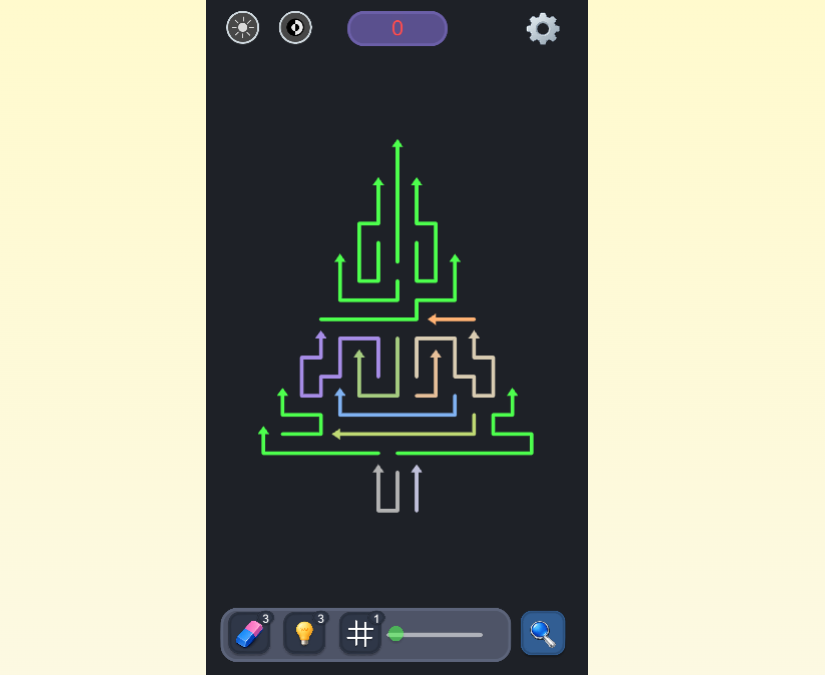
Arrow Puzzle Go is a portrait cartoon arrow puzzle where you clear hearts, trees, and other shaped maps by tapping arrows that point into empty space. Each arrow flies off in the direction it already faces. The level ends when the picture is empty.
The header number shows taps remaining—a heart might start at 31, and 0 means none are left. Order matters more than color: this is not a match game. If you’ve played Arrow Fall, you know the tap-to-clear rhythm, but here the map stays still.
How to Play
-
Find an open arrow. Check if its lane leads into clear background rather than another arrow shaft.
-
Tap or click the arrow. It flies off the map along its existing direction. Nothing falls or rearranges.
-
Use the gap. Removing one arrow may open a lane for another. If an arrow won’t move, it’s still blocked—clear the arrow in front of it first.
-
Watch the tap count. The header number is your remaining moves, not a score. Reaching 0 leaves no taps left.
Controls
Arrow Puzzle Go uses tap-and-click controls. Select an arrow to send it off; no dragging or keyboard controls are needed.
Interface buttons include:
- Lightbulb — badge 3
- Eraser — badge 3 (action not captioned on screen)
- Grid mark — badge 1
- Slider: drag the green knob
- Magnifying glass: zoom the map for a closer look
- Sun: top-left header control
- Round header button: beside the sun
- Gear: settings
The portrait layout works for one-handed play. You can play free online on Arrow Games with no download.
Tips for Playing Arrow Puzzle Go
-
Start at the rim. Outer arrows often point into open background first. Work inward as exits appear.
-
Clear the blocker, not the blocked arrow. When a tap does nothing, find the arrow occupying the lane ahead and remove that one first.
-
Check new gaps immediately. Every successful move creates open space. Look for nearby arrows aimed toward that gap.
-
Read direction before color. Matching three arrows does nothing. Follow the arrowhead and its lane instead.
-
On tree maps, work outside in. Clear the long outer arms before attempting inner turns. The center starts with fewer open routes.
-
Zoom crowded pictures. Use the magnifying glass when overlapping shafts make it hard to see clear paths.
-
Save bottom-bar items. The lightbulb and eraser each show 3, while the grid mark shows 1. Try obvious open arrows before spending these limited items.
What Skills Does Arrow Puzzle Go Help You Practice?
Arrow Puzzle Go builds lane reading and sequencing on shaped maps.
Spotting an open lane: Each arrow is a one-way exit. Check if its line reaches empty space or still ends in another shaft.
Choosing the first tap: Outer heads on the heart leave before the middle. On the tree, clear the long green arms before the inner turns.
Reading the color: Color helps you follow one shaft through a crowded picture. It does not trigger matches.
Why Play Arrow Puzzle Go?
A short portrait session: one hand, one map, no download. It suits you if you want a cartoon picture to clear rather than a dash or a dropping stack. Near Arrow Fall and Arrow Tap Out, except this heart or tree stays still until you empty it.
Ready to Play Arrow Puzzle Go?
Open a heart or tree, tap the arrows that point into open space, and empty the picture. Play Arrow Puzzle Go online free when you want one quiet map—a dense heart will usually keep you for a few more taps.
Related Games
- Arrow Puzzle Fall — It uses the same tap-to-send-arrow clearing idea, but adds falling pieces and a red-line threat for players who want a more reactive version of the puzzle.
- Tap Away Arrow — Its printed-arrow blocks and move-budget planning make it a close follow-up for practicing the same lane-reading and removal-order decisions.
- Arrows Go — It keeps the arrow-focused puzzle theme while shifting from clearing individual open arrows to tracing a route through an arrow field.
Arrow Puzzle Go FAQs
What is this game?
A portrait cartoon arrow puzzle. Arrows form maps such as a heart or tree, and you send them flying off until the picture is empty.
How do you play?
Tap an arrow that points into open space. It flies out. Repeat until every arrow has left the map.
How do the controls work?
Tap or click to clear. A lightbulb, eraser, and grid mark sit on the bottom bar with badges 3, and 1. A slider, magnifying glass, sun, round header button, and gear are also on screen.
How do you clear a map?
Send open arrows off the picture before the header tap count hits 0. The clear is an empty cartoon map.
Why did a tap do nothing?
Another arrow still occupies that lane. Clear the one in front, then tap again.
Can you play on a phone?
Yes. The boards are portrait, and one tap is the whole move, so one hand is enough.
Is it free?
Yes. You play Arrow Puzzle Go online free in the browser, with no download.
What does the header number mean?
Taps remaining. The heart shows 31. At 0 you cannot tap anymore, so empty the map before then.
What do the bottom buttons do?
Lightbulb, eraser, and grid mark carry badges. The magnifying glass lets you zoom. The screen does not label the eraser or grid mark actions.
Is this a color-match game?
No. Color helps you follow a shaft. Matching three of one color does not clear anything.
Do the arrows fall after a tap?
No. A legal tap flies that arrow off the map. The rest of the picture stays where it is.
What counts as a success?
Every arrow has flown off the cartoon map. An empty picture is the clear.
Share your tips for Arrow Puzzle Go
Share a useful route, a clever sequence, or a correction that can help the next player.
Comments are not collected on this independent fan site.
To report a broken game frame or suggest a guide correction, email [email protected] with the page URL.