





Geometry Arrow is a precision platformer where you guide an arrow through geometric obstacle courses by timing jumps and navigating tight spaces.
The core challenge is rhythm-based movement: you tap or click to launch the arrow forward, then time each subsequent jump to clear spikes, rotating shapes, and narrow passages without crashing.
This article covers the essential mechanics you need to progress—how the arrow’s momentum works, when to hold versus tap for different jump types, and which obstacles require specific timing patterns.
You’ll also find practical answers about checkpoints, level structure, and how the difficulty curve scales as geometric patterns grow more complex.
How to Play Geometry Arrow
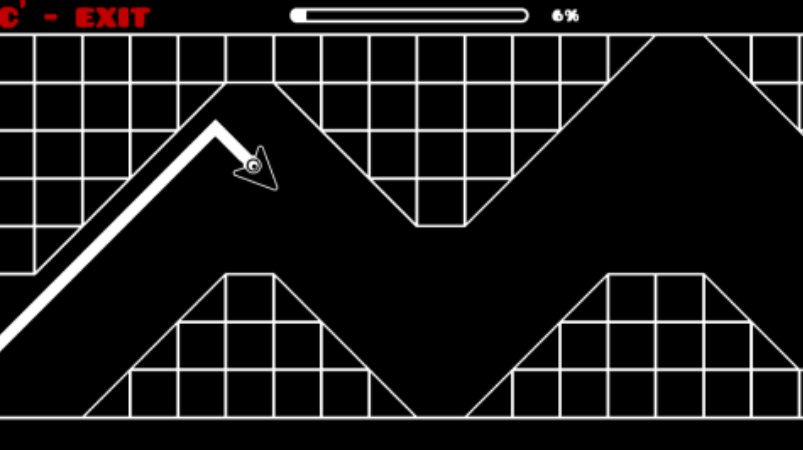
Geometry Arrow is a browser-based timing game where you guide a flying arrow through scrolling spike caves. Choose a numbered stage card, press to move, and reach the portal at the end. The cave auto-scrolls, so you control timing rather than steering.
- Start on card 1. The sunglasses-face card is the easiest stage.
- Use one movement input. Press the left mouse button, Spacebar, or touch the screen to move the Arrow.
- Watch the next opening. Hold to rise through a gap, then release before hitting the ceiling spikes.
- Avoid walls and obstacles. Pressing early sends the Arrow into upper spikes; pressing late leaves it in the lower wall.
- Reach the portal at the end to clear the stage.
This is not an arrow-out puzzle—the Arrow is the character. You do not use WASD or aim with a cursor.
Later stage cards feature harder face icons, including gritted-teeth and X-eyes. A 0% label means that cave has not been cleared. Use the menu arrow buttons to browse more cards; Level 13 stays locked until every earlier stage is complete.
Geometry Arrow Controls
| Input | Action |
|---|---|
| Left mouse button | Move the Arrow |
| Spacebar | Move the Arrow |
| Touch screen | Move the Arrow on mobile |
| Numbered stage card | Start that cave |
| Menu arrow buttons | Browse stage cards |
| Speaker icon | Toggle sound |
| Music Delay − / + | Adjust music timing; starts at 0.00 |
Hold the button, key, or screen while the Arrow needs to rise, then release to drop toward the next gap.
On phones, play in landscape mode. Geometry Arrow runs in the browser with no download.
Related Games
- Silly Sky — Its aerial, reflex-focused play is a natural next choice for players who enjoyed guiding an arrow through Geometry Arrow’s fast-scrolling spike corridors.
Enjoy!
Share your tips for Geometry Arrow
Share a useful route, a clever sequence, or a correction that can help the next player.
Comments are not collected on this independent fan site.
To report a broken game frame or suggest a guide correction, email [email protected] with the page URL.