




Silly Sky is an arrow-based skill game on Arrow Games where you tap to launch characters into the air and guide them through obstacle-filled levels.
The core mechanic is simple: time your taps to control height and direction, avoid hazards, and reach the goal. This article covers the most useful gameplay details—how the arrow controls work, what obstacles you’ll face, and practical tips for clearing levels without unnecessary retries.
You’ll find specific answers about timing mechanics, common traps that catch new players, and which strategies work best for different level types.
Play Silly Sky on Arrow Games
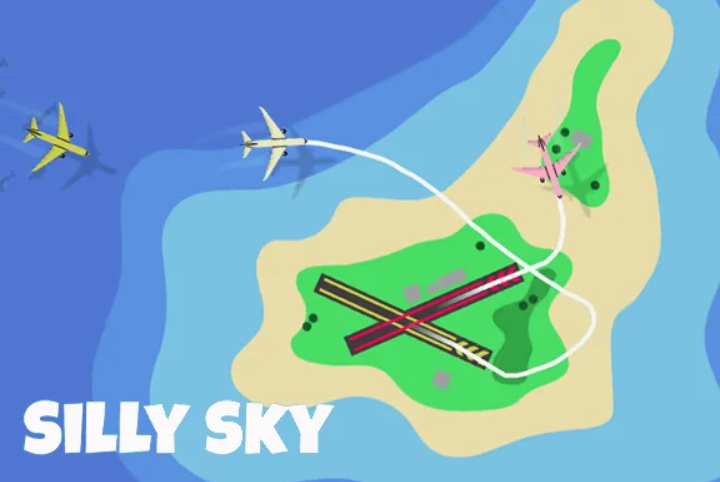
Silly Sky is a top-down draw-to-land puzzle where you drag a white path from each plane or helicopter to a color-matched runway, then watch that craft fly the line. You route traffic from above rather than piloting.
Open the Island map, pick Easy, Medium, or Hard, and start. Drag a route from an aircraft to its landing area, then release—the craft follows that white line, and you cannot correct it mid-flight.
Your goal is to fill the n/10 landing counter by safely clearing every aircraft in the wave. Later rounds send more traffic from different directions, making landing order and route spacing critical. Match planes to runways with the correct chevron color; helicopters need the circular pad marked H, not long strip.
Sandstorms block runways, thunderstorms disrupt guidance, and peaks clip paths that cut too close. When two craft collide, the crash plays in slow motion so you can see which lines crossed.
How to Play Silly Sky on Arrow Games
Drag from the aircraft to its destination.
Select a plane or helicopter and drag toward its landing area. The white line shows the route it will follow.
Match the aircraft to the right target.
Planes need runways with matching colored chevrons (yellow, red, blue, pink, or green). Helicopters must use the circular pad marked H.
Let traffic clear before adding another route.
Aircraft continue moving after you release. If routes cross at the wrong time, the craft collide and the wave fails.
Route around hazards.
Mountain peaks, storm cells, and other terrain block safe direct lines. A sandstorm can shut down a runway, while thunderstorms can disrupt guidance and leave an aircraft off course.
Complete the wave.
Each safe landing advances the counter from 2/10 to 4/10 and beyond. Clear the current traffic before the map becomes too crowded.
Silly Sky Controls for Arrow Games
Silly Sky uses simple touch or mouse routing. You create the flight path, then watch the aircraft follow it.
| Input | What it does |
|---|---|
| Drag / swipe from a plane or helicopter | Draw a route to the correct runway or helipad. |
| Tap x1 | Change playback speed for aircraft already following routes. |
| Tap menu | Open the in-round menu. |
| Tap Hangar plane icon | Open the aircraft roster. |
| Tap speaker or music icon | Toggle sound effects or music from the Island screen. |
| Tap Easy, Medium, or Hard | Set Island difficulty before starting. |
| Tap map arrows | Switch maps from the Island screen. |
Start each drag directly on the aircraft, pull the route to its matching target, and release. The x1 speed control changes how fast aircraft already on a path fly but does not redirect an aircraft after launch.
Silly Sky Features on Arrow Games
- Draw-to-land paths — white lines from each craft to a runway or helipad
- Color-matched pads — yellow, red, blue, pink, or green chevrons; helicopters use the H circle
- Weather and peaks — sandstorms block a strip, thunderstorms break guidance, mountains clip a low line
- Collision slow-mo — crossed paths play back slowly so you can see the mistake
- n/10 counter — the wave goal sits in the corner
- Hangar roster — fighters, jets, helicopters, drones; B-2 Spirit appears on Jungle Storm, Canyon, and Rice Fields
- Optional upgrades — extra slow-mo before a crash, a score multiplier, or blasting a mountain in the way
Desert maps add pyramids, an oasis, and mixed pads, so you match craft to pad type as well as color.
What Skills Can Silly Sky Help You Practice?
Path planning — You draw a corridor that must stay empty until that craft touches down. Short, direct lines are safer than decorative loops.
Traffic timing — The first legal path is not always the best path. After a few rounds you land the closest craft first so a 4/10 wave does not stack four lines over the same runway.
Pad matching — Chevrons and H pads are not decoration. A helicopter on a long strip, or a jet on a helipad, is a wasted line.
Hazard reading — Sandstorms, thunder, red triangles, and peaks are all “do not draw here.” You reroute instead of hoping the craft climbs over them.
Tips for Playing Silly Sky Online on Arrow Games
-
Plan the landing order first. Check which aircraft has the cleanest route to its matching destination and send it before traffic begins to stack around the same area.
-
Keep routes visibly separate. The white path is the aircraft’s actual course. Leave room between lines, especially when planes and helicopters are approaching from opposite sides of the map.
-
Use short routes when the airspace is open. Direct lines clear aircraft quickly, but only when they do not cut through another route, hazard, or occupied landing area.
-
Wait for a busy target to clear. Two aircraft arriving at the same runway or helipad at once can collide even if each route looks correct. Land one, then send the next.
-
Treat weather and terrain as walls. Jungle storms, clouded city routes, desert mountains, and tornado-filled farmland can make the obvious path unsafe. Draw around the obstacle instead of cutting close to it.
-
Watch the full map between drags. New arrivals can appear while another craft is still following its route. Scan the airspace before committing the next line.
-
Helicopters need the H pad. Do not send them down a long runway out of habit.
-
If a sandstorm sits on the strip, wait or reroute. Drawing onto a blocked runway will not land the plane.
-
Open Hangar once so you know which shapes (including B-2 Spirit) belong to later maps.
Silly Sky FAQs on Arrow Games
What is Silly Sky?
A free draw-to-land puzzle. You sketch a white path from each plane or helicopter to a matching runway or helipad, then that craft flies the line. Weather, peaks, and other traffic can wreck a sloppy route.
How do you play Silly Sky?
Drag from an aircraft to its pad. Match chevron color (or the H for helicopters). Land enough craft to fill the n/10 counter without collisions.
How do you control the planes?
You do not fly them. You draw the path; they follow it. On a phone, one thumb drag is enough.
How do you complete a wave?
Keep landing until the counter hits the goal (for example 10). A crash from a crossed path, a peak, or a storm ends that attempt.
Why did the plane ignore the line you drew?
A thunderstorm can break guidance so the path no longer sters the craft. Redraw after the storm, or send that plane around the cell.
Why can’t you land on the runway?
A sandstorm on the strip blocks landings. Wait it out or draw to a different matching pad if the map has one.
What does the Hangar show?
The aircraft roster—unlocked craft in color, locked ones as gray silhouettes. B-2 Spirit is listed as appearing on Jungle Storm, Canyon, and Rice Fields.
Can you play on a phone?
Yes. The layout is portrait-friendly. Draw with one thumb. No app install is required—play Silly Sky online in the browser. Landscape is also available.
Is Silly Sky free?
Yes. You can play this Silly Sky game online free for Arrow Games, with no download.
What game is most similar?
Draw 2 Save is the nearest draw-then-watch match. Silly Sky keeps that sketch-and-release loop and adds live landings, weather, and a shared sky.
Related Games
- Bus Parking Out — Plan the order vehicles move out of a crowded lot, delivering the same collision-avoidance and route-timing puzzle pressure as sequencing aircraft landings in Silly Sky.
Why Play Silly Sky on Arrow Games?
Silly Sky runs free in a browser with no download, installation, or account required. It works on PC, Mac, Chromebook, tablet, and mobile phone, so you can use touch controls on a phone or draw more precise routes with a mouse on desktop. The game supports Chrome, Firefox, Edge, and Safari. This fits a commute or a spare minute: portrait, one thumb, a counter you can read at a glance, and a round you can finish without a download.
Share your tips for Silly Sky
Share a useful route, a clever sequence, or a correction that can help the next player.
Comments are not collected on this independent fan site.
To report a broken game frame or suggest a guide correction, email [email protected] with the page URL.